DeepSeek Harness with Command Code and OpenCode Go
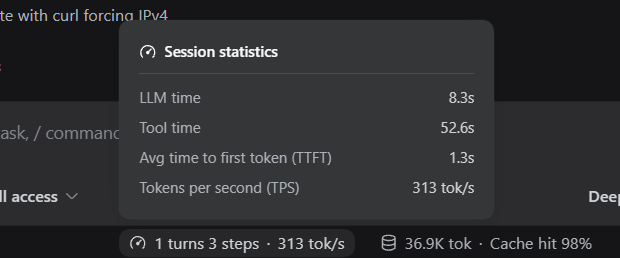
I installed DeepSeek Harness (DSH) because its web UI shows tokens per second without extra setup. After using it for a while, I wrote down what mattered and how I connected my two providers.
Agent work consists of many calls in a row, so speed changes how the session feels. A model writing 15 tokens per second feels broken; one writing 80 feels fast. Most harnesses hide that number. DSH puts it in the UI.
DSH is a harness, not a model. It does not bring an account or a key. I connect my own subscriptions and keep the keys under my control.
I first noticed the speed readout in a post on X by @Ubendev, then installed DSH to try it.
What you need
- Node.js 22 or newer. I run Node 24.
- A terminal on macOS, Linux or Windows.
- One model provider. Here the providers are a Command Code account and an OpenCode Go subscription. You do not need both. One is enough to start.
DSH calls the program that runs the agent loop a harness, and the brain behind it a model. The model plugin speaks the OpenAI-compatible wire, so other providers work too. A free endpoint or a local server, such as Ollama, is enough.
Install DeepSeek Harness
Try it without a permanent install:
npx @deepseek-ai/dsh webFor a permanent install:
npm install -g @deepseek-ai/dsh
dsh web
The web UI listens on 127.0.0.1 and prints a link with a token.
How DSH finds a model
DSH uses plugins. Each plugin owns a section of the settings file, and the section name is the plugin ID.
The part that talks to models is the plugin @deepseek-ai/dsh-llm-pi-ai. Its settings section is llm-pi-ai. It speaks the OpenAI-compatible wire and the Anthropic-compatible wire.
So every provider goes under one key:
llm-pi-ai:
  providers:
    <provider-id>:
      ...
The default model lives in its own section, agent-default-model.
Set the keys
The settings file does not contain secrets. It names the environment variables that contain the keys:
export OPENCODE_API_KEY="your-open-code-go-key"
export COMMANDCODE_API_KEY="your-command-code-key"
Define only the variables of the providers you add. Open a new terminal after this step.
Step 1: add Command Code
Command Code has its own OpenAI-compatible endpoint: https://api.commandcode.ai/provider/v1. The model id is deepseek/deepseek-v4.1-flash. The route reads its key from COMMANDCODE_API_KEY.
Step 2: add OpenCode Go
OpenCode Go is an OpenAI-compatible gateway at https://opencode.ai/zen/go/v1. It accepts the model deepseek-v4.1-flash. It needs one stable session header, x-opencode-session. The route reads its key from OPENCODE_API_KEY.
The final settings
Here is the whole ~/.dsh/settings.yaml:
ui-onboarding:
  welcomeNoticeVersion: 2026-08-13.1
permission:
  defaultPreset: danger-full-access
ui-theme:
  preference: dark
agent-default-model:
  provider: command-code
  model: deepseek/deepseek-v4.1-flash
llm-pi-ai:
  providers:
    command-code:
      displayName: Command Code
      api: openai-completions
      baseURL: https://api.commandcode.ai/provider/v1
      apiKeyEnv: COMMANDCODE_API_KEY
      defaultContextWindow: 1000000
      defaultMaxTokens: 32768
      models:
        - id: deepseek/deepseek-v4.1-flash
          name: DeepSeek V4.1 Flash (Command Code)
          contextWindow: 1000000
          maxTokens: 32768
    opencode-go:
      displayName: OpenCode Go
      api: openai-completions
      baseURL: https://opencode.ai/zen/go/v1
      apiKeyEnv: OPENCODE_API_KEY
      headers:
        x-opencode-session: ses_dsh_8f2a1c4e7b6d4a90
      defaultContextWindow: 1048576
      defaultMaxTokens: 32768
      models:
        - id: deepseek-v4.1-flash
          name: DeepSeek V4.1 Flash
          contextWindow: 1048576
          maxTokens: 32768
Start dsh web again. The model menu shows Command Code and OpenCode Go as separate groups, and I can choose a model for each session. The agent-default-model block sets it for a new session. To make Command Code the default, change two lines:
agent-default-model:
  provider: command-code
  model: deepseek/deepseek-v4.1-flash
The context window
The two routes show 1,000,000 for Command Code and 1,048,576 for OpenCode Go, because each API reports its own number:
- Command Code returns
context_length: 1000000. - OpenCode Go does not publish it, so I use 1,048,576, the binary 1M that DeepSeek uses.
The number is metadata for history compaction and display. The server enforces the actual limit.
Before DSH
Before DSH I used two native desktop apps: Command Code Desktop and OpenCode Desktop. Both talk to the same subscriptions and keep the same keys. Neither showed tokens per second. When a model felt slow, I blamed the network.
DSH adds that measurement, so a slow session becomes a fact rather than a feeling.
Wrap up
DSH is local and plugin-based. It keeps my subscriptions, the settings are one YAML file, and a new provider is a small block:
- DeepSeek Harness: github.com/deepseek-ai/deepseek-harness.
- Command Code: commandcode.ai.
- OpenCode Go: opencode.ai/docs/go.